



The USB C Docks & Hubs Manufacturer!
MSLFORCE is a leading manufacturer providing high-quality computer accessories and peripherals. Our main business scope includes offering a wide range of products, from power adapters and cables to ergonomic stands and network solutions.


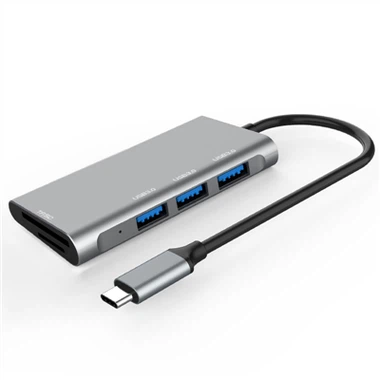


No need always take your laptop everywhere . The MSLFORCE USB-C Cable , Adapter allows you push contents to UHD , Projector , Monitor , TV From your mobile phone , Tablet PC and other USB-C Portable smart devices . Also compatible with Macbook , MacBook Pro , iMac , iMac Pro , other slim laptop with USB-C . allows mirror or extend to big screen. with HDMI port , VGA port , DisplayPort , Mini DisplayPort , USB3.0 OTG and so on. For example . THE MSLFORCE UNIQUE DESIGN of USB-C to HDMI Cable. Allows reversible plugging and provides universal compatibility with next-generation computers and devices. HDMI output supports resolutions up to 4K and provides a simple plug-and-play connection to high-definition displays or monitors.
Why choose us
OEM /ODM
We specialize in OEM and ODM services, ensuring tailored solutions to meet the unique needs of our clients.
Production Capacity
MSLFORCE boasts significant production capacity, enabling us to meet a wide range of demands for our products, including PD chargers, SSD Enclosure ,USB A and USB C cables, adapters, hubs and multiPorts Docking station. Our two dedicated production areas focus on consumer gadgets and USB3.1 Type-C products, allowing us to efficiently manage large-scale manufacturing.
Professional sales team
We have professional and experienced sales team who can respond to you high efficiently within 24 hours.
Experienced workers
Our team combines youthful energy with seasoned expertise, ensuring that every product we manufacture meets rigorous standards
Sales Market
We have a very good reputation at home and abroad. Our products are mainly exported to East Europe, Western Europe, The Nordic Market and Southeast Asia.
Our company provides the following products
|
All ports work at the same time |
USB-a port / m.2 m-key / PD function needs to support simultaneous use |
|
Working temperature and humidity |
0~40℃ / 10~90%RH |
|
Storage temperature and humidity |
- 10~60℃ / 10~90%RH |
|
System compatibility |
Win7 / win8 / windows10 / Mac OS 10.10 and above / Linux Ubuntu 18.04 and above |
|
Chipset 1 |
VL822-Q7+VL103R-Q4+RTL9210B+ANX7517+MP9928 |
|
Chipset 2 |
VL822-Q7+VL103R-Q4+RTL9210B+PS186+MP9928 |
|
PCB process requirements |
6-layers Plate thickness 1.2mm |
|
PCB materials |
FR4_ A1 94V0 |
|
PCB proceesing |
Tin spraying |
|
Impedance |
90 ohms 100 ohms |
|
PD Power |
PD withholding power Withhold 5W, do not drop the USB flash disk when plugging in and out the adapter, do not interrupt the HDMI output image, and the maximum charging power can reach 100W |
Key Advantages of a USB-C Docking Station
Versatile Connectivity
One of the most significant advantages of a USB-C docking station is its ability to expand your device's connectivity options. Many modern laptops are equipped with only a few USB-C ports, which can be limiting when you need to connect several peripherals.
Multi-Monitor Support
For professionals who rely on multiple screens, such as graphic designers, coders, or financial analysts, a USB-C docking station is indispensable. Many docks support dual or even triple monitor setups, allowing you to extend your desktop across multiple displays. This expanded screen real estate can dramatically improve your productivity by enabling you to work on several tasks or documents simultaneously.
Seamless Charging and Power Delivery
One of the standout features of USB-C technology is its ability to deliver power alongside data. Many USB-C docking stations come with power delivery (PD) capabilities, meaning they can charge your laptop or tablet while also connecting to other peripherals. This dual function reduces the need for multiple chargers and cables on your desk, keeping your workspace tidy and efficient.with power delivery, your device stays charged and ready to go even when running demanding applications or powering external devices.
Enhanced Portability
USB-C docking stations are designed with portability in mind. They are typically compact and lightweight, making them easy to carry in a laptop bag or backpack. This portability is especially useful for professionals who travel frequently or work from multiple locations. Whether you're moving between home and the office, or working from a café, a USB-C dock allows you to quickly set up a fully functional workspace wherever you are.
Simplified Workspace
A cluttered workspace can lead to distractions and inefficiencies. By consolidating multiple connections into a single docking station, you can reduce cable clutter and create a more organized and aesthetically pleasing workspace. This simplification makes it easier to disconnect and reconnect your laptop, especially when you need to move your device frequently.
Future-Proofing Your Setup
USB-C is rapidly becoming the standard for many devices, thanks to its versatility and power. Investing in a USB-C docking station is a forward-thinking move that ensures your setup remains compatible with future devices and accessories. As more manufacturers adopt USB-C, your dock will continue to be a valuable accessory that enhances your device's capabilities.
Functional Test
Check for compliance with declaration specification.
Functional checks on operating systems and application context.
Check for POD power supply.
Various consumer use scenario tests, e-sports/audio multi-screen/power management/expansion/power supply chain connection and other related applications.
Regression tests such as operating system upgrades
Advantages of USB C Hubs
Durability
USB-C hubs have a longer life than any other USB type. They are designed to withstand more than 10000 times of insertion and removal. Most of the time, the leaf spring of a standard USB gets stressed by the constant insertion and removal of cables. But USB-C cables bear more stress rather than the ordinary USB port in the devices.
Convenience
The USB Type C has a plug that can be inserted both ways, making it more convenient than before. You cannot find a USB cable that has only Type-A or Type-B connectors on both ends.
It has to have different types of connectors on each end. USB Type C has the same connector on both ends, so you don't have to worry about which way to connect it. USB Type C is a better way to connect things to each other quickly and conveniently than older USB Connectors.
Improved Productivity
Now you don't have to deal with a lot of cables and waste your time in handling them. USB-C cables have sorted all your problems. Your productivity will ultimately increase when you focus more on your work and given tasks.

Types of USB-C Hubs
Basic hubs (USB C Dongles)
These hubs usually offer only a few additional ports beyond what is already available on a device, such as USB-A or HDMI.
Multi-port hubs
These hubs offer a wider range of ports and features, including USB-A, HDMI, Ethernet, SD card readers, and audio jacks, among others.
Power delivery (PD) hubs
These hubs provide charging capabilities for connected devices, including laptops, smartphones, and tablets.
Display hubs
These hubs support multiple displays and high-resolution video output, normally these hubs should contain two or more display connectors (HDMI or DisplayPort, and 90% should be self-powered, a bit bulky).
A USB-C hub multiport adapter has 3 applications
As a USB Type-C hub with a single port. This method allows you to connect various devices to the hub, including your phone, laptop, and tablet.
Serves as an expansion port for a USB Type-A port already existing. In this manner, you can connect multiple devices to your computer by using the hub.
To maintain cable organization. Using a USB Type-C hub can keep everything organized if you have numerous wires and are unsure where to put them.
FAQ
MSL, which stands for 'MADE FOR SIMPLE LIFE', holds a strong belief in designing, developing and carrying out our own production. We are one of the professional China suppliers of usb c docks & hubs, providing online sales at low price and small quantity order acceptable. We are equipped with a productive factory. Please be free to wholesale the MSL brands' bulk of USB TYPE C Cable and Adapter in stock from us.
USB c to usb3 0 with Micro sd card reader, belkin usb type c cable, USB C multiport adapter hdmi ethernet , Type C M To VGA F , Type C M To HDMI F