



The Docks & Hubs Manufacturer!
MSLFORCE is a leading manufacturer based in Shenzhen—one of China’s most innovative and dynamic cities. We specialize in the development and production of high-quality computer accessories, peripherals, and mobile-device solutions. Our core business covers a broad product portfolio and comprehensive OEM/ODM services, ranging from audio-video, data, and power accessories to network connectivity and conference-ready cable-free extender solutions. With strong engineering capability and a commitment to innovation, MSLFORCE continues to deliver reliable, performance-driven products for global brands.


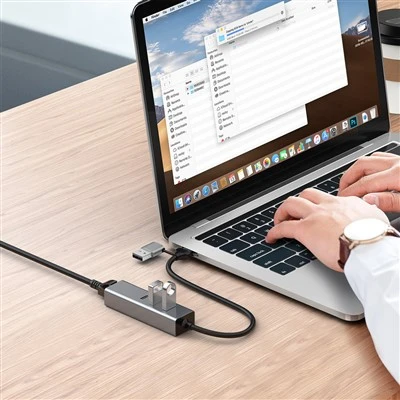
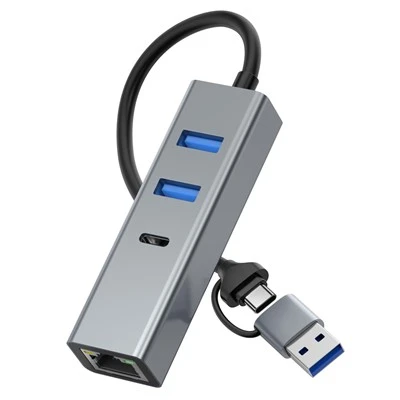


MSLFORCE has strong expertise in the research, development, and manufacturing of USB-C cables, adapters, hubs, and docking stations, all compatible with Intel Thunderbolt 3. We provide a complete one-stop solution for high-performance Mac and PC accessories.
Why Docking Stations Are Essential for Modern Workspaces
In today’s office and home-office environments, docking stations have become indispensable tools. As laptops become slimmer and ports become fewer, users rely on docking stations to restore full connectivity—expanding a single USB-C port into multiple displays, high-speed storage, wired Ethernet, audio interfaces, and charging capabilities. This enables a clean, organized workspace while supporting multitasking, productivity, and seamless switching between work modes.
Whether used for Multi-monitor setups, conference calls, creative workflows, or high-speed data transfer, a docking station centralizes all peripherals into one hub, reducing cable clutter and improving workflow efficiency. For professionals working remotely or switching between office and home setups, docking stations allow instant plug-and-play access to a full desktop experience with a single cable.

preminum USB C Docks Chipset Supplier
cooperative partner
We maintain preferred cooperation with the listed original audio-video-data and PD chipset manufacturers or their authorized distributors to support our product development.


|
All ports work at the same time |
USB-a port / m.2 m-key / PD function needs to support simultaneous use |
|
Working temperature and humidity |
0~40℃ / 10~90%RH |
|
Storage temperature and humidity |
- 10~60℃ / 10~90%RH |
|
System compatibility |
Win7 / win8 / windows10 / Mac OS 10.10 and above / Linux Ubuntu 18.04 and above |
|
Chipset 1 |
VL822-Q7+VL103R-Q4+RTL9210B+ANX7517+MP9928 |
|
Chipset 2 |
VL822-Q7+VL103R-Q4+RTL9210B+PS186+MP9928 |
|
PCB process requirements |
6-layers Plate thickness 1.2mm |
|
PCB materials |
FR4_ A1 94V0 |
|
PCB proceesing |
Tin spraying |
|
Impedance |
90 ohms 100 ohms |
|
PD Power |
PD withholding power Withhold 5W, do not drop the USB flash disk when plugging in and out the adapter, do not interrupt the HDMI output image, and the maximum charging power can reach 100W |

Classification of USB C Docks
Number of Ports
Consider the quantity of ports the docking station offers to ensure that it accommodates the specific peripherals. 2 in 1 , 3 in 1 , 4 in 1 , 5 in 1 ,6 in 1 , 7 in 1 , 8 in 1 , 9 in 1 , 10 in 1 , 11 in 1 , 12 in 1 , 13 in 1 , 14 in 1 , 15 in 1 and Maxinium we do 24 in 1.
Charging Capabilities
Consider whether the docking station supports power delivery for charging capabilities. If you plan to use the dock for charging your laptop or other devices, it is crucial to consider the dock with fast charging capacity. USB C Docking with PD Output or USB C Docking without PD output
Build Quality and Durability
Examine the build quality and durability of the docking station to ensure longevity and reliability, offering stable connections for your devices over an extended period. sort ABS Plastic USB C Docking and Aluminum Alloy USB C Docking Station
Video Resolution and SST / MST feature
If your work requires Special audio, video output , 4K30 USB C Dock , 4K60 USB C Dock , 8K60Hz USB C Dock , 4K144Hz USB C Dock and also customized like Dual Video output , Triple Video Output , Quad Vide Output
Additional Features
Some of our USB C docking station intergrate with some additional features, such as Laptop Stand with USB C Dock , USB C Docking with SSD M.2 Enclosure , Monitor Stand with USB C Docking, Magnetic USB C HUB , Wall-mounted USB C Docking , Rotation Stand with USB C Dock and so on.
Uses of a USB-C Docking Station
One of the primary reasons to purchase a USB C docking station is data transfer. The user can quickly transfer data such as graphic design, video, and images from one terminal to another. The data transfer takes place at high speed to facilitate the user.
A USB C docking station is a one-port solution for laptop charging. The power delivery pass-through feature allows the user to perform other functions while the laptop charges. They can disconnect the charger and the hub easily without mechanical damage.
USB C dock station is a must-have in an office as a media output display. It makes it easier for employees to connect their laptops that do not have an HDMI , VGA , DVI , DisplayPort or any other Video port.the best results factor in the monitor, internal component, and docking station type.
Advantages of USB-C Hubs
You can operate several devices simultaneously
Several USB C Hubs boost your freedom and productivity whether you're working on a paper on one device, transferring images to another, or playing music from your laptop through speakers.
It is simple to transmit data between devices
A Multiple USB C Hub makes it simple to transfer data between devices. Without needing to unhook and replug wires, you may transfer files as soon as you plug one device into the hub.
You'll save time overall
By using multiple USB C hubs, you'll avoid having to constantly plug in and out cables, which will save time overall.
Difference Between a USB-C Hub and a Docking Station
Portability
USB-C hubs are designed with portability in mind. They're small enough to toss in your bag and take on the go, allowing you to expand your laptop's connectivity anywhere.
Power and Performance
Since docking stations are more stationary and have their own power source, they can often provide more power (up to 100W) to charge your laptop and connected devices.
Price
Due to their larger size and increased capabilities, docking stations also come at a higher price than USB-C hubs. While you can find basic USB-C hubs for under $30, full-featured docking stations commonly run $200-300.

Types of USB-C Hubs
Compact USB-C Hubs
A compact USB-C hub has advantages, as it is small and easy to carry when you travel. They usually have only a few places for you to plug things in, like USB, HDMI, and SD card slots.
Multiport USB-C Hubs
They usually have USB, HDMI, internet, SD card slots, and audio ports together. A Multiport USB-C Hub is useful for people who need to connect many things to their computers simultaneously.
USB-C Docking Stations
Docking stations are things that can turn laptops into bigger and more powerful computer setups. They have many kinds of holes for plugging in things like USB cords, HDMI cables, internet cords etc.
Power Delivery (PD) USB-C Hubs
These are the gadgets that allow for both data transfer and power delivery. It lets you charge your USB-C device while also using other devices. A PD hub usually has USB-A, HDMI, and SD card slots, along with other USB-C ports for charging.
Specialized USB-C Hubs
Places where videos are the main focus, might have more than one place to connect several screens using HDMI or DisplayPort.
FAQ
MSL, which stands for 'MADE FOR SIMPLE LIFE', holds a strong belief in designing, developing and carrying out our own production. We are one of the professional China suppliers of docks & hubs, providing online sales at low price and small quantity order acceptable. We are equipped with a productive factory. Please be free to wholesale the MSL brands' bulk of USB TYPE C Cable and Adapter in stock from us.
DP male to hdmi female 4k, Usb c To Displayport 1 2 Cable, 10 in 1 multiport adapter hub , Cable , Adapter