



USB C HDMI KVM Presentation Switcher Designed For Huddle Rooms And Meeting
Description
Technical Parameters
MSL, which stands for 'MADE FOR SIMPLE LIFE', holds a strong belief in designing, developing and carrying out our own production. We are the trustful partner of usb c hdmi kvm presentation switcher designed for huddle rooms and meeting, providing online sales at low price and small quantity order acceptable.
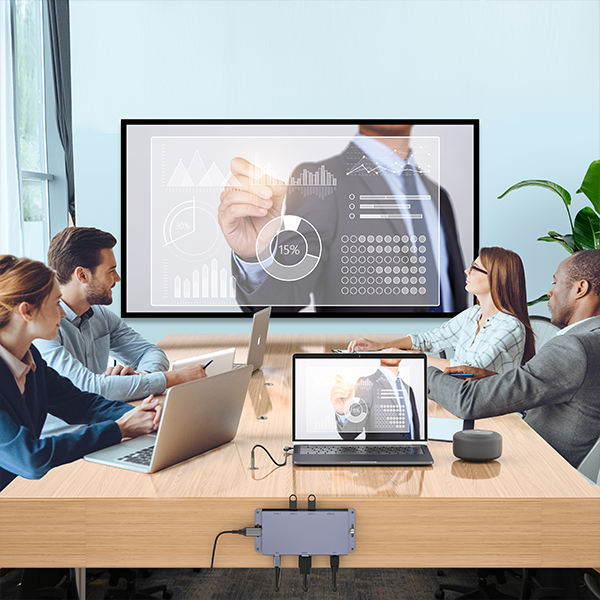
Mounting under a table or fix on the side of table or wall . the MSLFORCE 's ODM/ OEM HUB with Pro AV setups to extended host connectivity and versatile functionality is ideal for video conferencing and multimedia integration. it is your all-in-one solution for professional video conferencing and seamless content sharing. With dual input options - USB-C and HDMI + USB A3.2 - this smart hub automatically switches to the active source, making it easy to use for any user in any meeting room.
Instructions:
Input supports 1x HDMI port, and 1x USB-C port with an USB-C charging port which can supply power to the USB-C device.The switcher features virtual interaction function, so that it can automatically wake up the connected PC that is in standby mode, which can reduce the switching time. It also supports direct switching through buttons on the front panel, IR remote, and hotkey through keyboard/mouse connected to the special USB port. It provides a wide compatibility choice for different operating systems, such as Windows, Mac OS and Linux, no driver required and simple plug and play.
Support Ultra-wide Screen, resolution up to 4K@60Hz, 2K@60Hz/144Hz as specified in HDMI 2.0
HDR, HDR10, HDR10+, Dolby Vision, HLG pass-through
Using only 1 set of keyboard, mouse and monitor to control 2 computers☆Support video fast switching, and keyboard/mouse seamless switchingEach input port has an EDID emulator to provide the correct information for the PC
Support hot plug, disconnect or connect devices to the KVM at any timeSwitching via front panel buttons, keyboard/mouse hotkeys, IR remote control, and RS-232 commands
Support auto switching
Input supports 1x HDMI port and 1x USB-C port
With USB-C charging port, supporting PD3.0 charging 100W
Advanced hardware/software design and production ensure zero latencyThe integrated USB 3.0 ports allow you to share USB peripherals like printer, scanner, webcam and hard disk between computers with data transfer rate up to 5Gbp/s
Compact design for easy and flexible installation

This box solves the challenge of having a permanently installed meeting room PC while also providing the option for BYOD (Bring Your Own Device) connectivity directly from the table and sharing USB devices between them.

| HDMI Technical : | |
| HDMI Compliance | HDMI 2.0 , HDCP compliance |
| USB C DP ALT Mode | DP1.4 Alt mode |
| Video bandwidth | 18Gbps |
| Audio Video Latency | No Latency |
| Video Resolutions | Up to 4K@60Hz , 2K@60HZ/144HZ |
| Colour Space | RGB 4:4:4, YCbCr 4:4:4, YCbCr 4:2:2, YCbCr 4:2:0 |
| Colour Depth | 8/10/12bit |
| HDR | HDR,HDR10,HDR10+,Dolby Vision,HLG |
| Audio Formats | HDMI IN/OUT:LPCM, Dolby Digital/Plus/EX, Dolby True HD, Dolby Atmos, DTS, DTS-EX, DTS-96/24, DTS High Res, DTS-HD Master Audio, DTS:X, DSD L/R OUT:PCM 2.0CH |
Front Panel :

| 1 | USB3.0 Ports | USB 3.2 Gen 1 device ports, connected to USB 3.0 flash disk, camera, printer etc. |
| 2 | USB3.0 Ports with hotkey mode | ▪When Hotkey switch to OFF mode, these two ports support USB 3.2 Gen 1 device.▪When Hotkey switch to ON mode, these two ports support USB 1.1 mouse and keyboard only. |
| 3 | Power LED indicator | The Power LED will light in green when the product is working, and red when the product is on standby. |
| 4 | Input channel LED 1/2 | When the HDMI input port 1/2 is selected as the signal input channel, the corresponding LED 1/2 will light in green. |
| 5 | Automatic LED | When the auto switching function is enabled, the AUTO LED will light in green, otherwise it will light off. |
| 6 | IR Window | IR signal receiving window. |
| 7 | Hotkey Switch | Use the switch to enable/disable the hotkey switching mode. ▪Switch to "ON": The connected keyboard and mouse supporthotkey switching mode. ▪Switch to "OFF": The connected keyboard and mouse don'tsupport hotkey switching mode. |
| 8 | Select Button | Press the button to switch the input channel. |

| 1 | PC1 Sourcing | HDMI:HDMI signal input port, connected to HDMI source device such as PC with HDMI cable. USB HOST:USB Host port, connected to PC 1. It can be used for firmware upgrade. |
| 2 | PC2 Sourcing | USB-C:USB-C signal input port, connected to USB-C source device such as PC with USB cable. USB charging:USB-C power input port (supporting PD 3.0 protocol). You can connect the charging port with a power adapter to power PC 2 which is connected to the USB-C port. |
| 3 | Display HDMI | HDMI signal output port, connected to HDMI display device such as TV or Monitor with HDMI cable. |
| 4 | L/R Audio | 3.5mm analog audio PCM2.0 output port. |
| 5 | RS-232 | 3-pin phoenix connector, connected to a PC or control system for serial port upgrade. |
| 6 | IR Ext Port | IR signal receiving port, connected with 38KHz IR Receiver cable. If the IR signal receiving window of the unit is blocked or the unit is installed in a closed area out of infrared line of sight, the IR receiver cable can be inserted to the "IR EXT" port to receive the IR remote signal. |
| 7 | DC 12V Port | DC 12V/1A power input port. |
USB C Female Host Port Docking Station for ProAV setup
- 1. Plug all the necessary cable into the hub before fix the 2x1 KVM Switcher (Model No: KVM2x1HDMIUSBC) such as : The sourcing port HDMI TYPE-A 4K 8K cabble male + USB A to USB TYPE-B 3.0 cable. The sourcing port USB C DP alt mode + TYPE-C to TUPE-C PD charging cable , The PTZ Camera Logitech Meetup or Yealink UVC40.on USB3.0 Port. The keyboard and mouse on USB2.0 Port , The USB-C Flash Memory Sticker or USB C SSD Enclosure , The DC12V cable and so on
- 2.Use screws to fix the HUB to the back of the conference table or office desk or even fix on the wall .
- 3.Connect MSLFORCE Patented Desktop Socket with USB-C female to Male cable Design. To connect the HUB host port USB C full-featured Port.about USB C Table Socket For The Conference Room , Click the link to learn more .
- 4.Use a USB3.2 Gen2 Male to Male 1.2M cable to connect the USB-C Table Socket to laptop or PC
- 5.Now you can enjoy the conference or meeting in your huddle room with the visitors. ( Easy switch to the new presentor and allows sharing the terminals devices for the new presentors . Simply plug out your USB C host cable and plug into the new presentors's laptop with USB-C)
Advantages for Pro AV Setups
- Enhanced Video Conferencing:
HDMI output delivers high-quality video to conference room displays, ensuring crystal-clear visuals for meetings.
- Distance Flexibility:
Ideal for setups where the laptop/host PC is located at a distance from the hub or other AV equipment.
- Efficient Cable Management:
Ensures a professional and clean look for conference rooms or home offices.
- Reliable Network Connectivity:
- Universal Compatibility:
Seamlessly integrates with Zoom Rooms, Microsoft Teams, Google Meet, and other conferencing platforms.
- Power Delivery:
Schematic diagram

Example Use Cases:
- Corporate Meeting Rooms:
- Educational or Training Environments:
- Home Office Video Conferencing:
Would you like to explore customization options for market protection ,branding, additional features, or packaging? MSLFORCE could help tailor this product to meet market demands
Certifications
Create a comprehensive solution for product Intellectual property protection

Trademark

Appearance patent

EU patent

Product CE

ROHS & REACH

FCC
CheckOut Our Work Process for project development

01
Pre-sales Consultancy
Free consultation service to help you better understand our products and Project Planning.

02
Order a Project
Working over 15 years IT solution developing software ,PCB Layout Circuit Design and Enclosure Design for clients

03
Production & Shipping
Producing or checking existing products according to your customised order and dispatching the products

04
Complate Work
Complate Project Design , Provide detailed manuals, firmware updates, and aftersales services to our partner.
Wide range of application scenarios
MSLFORCE has successfully completed several ODM (Original Design Manufacturer) Conference Video HUB Solutions design, especially in the areas of conference room huddle room and Modern office solutions , Video systems and Neat and Clean office solution. Here's an overview of some key projects:
 Video SolutionsIntergrated solutions Provider -MSLFORCE
 USBCHUB2Mounted at side of table
 USBCHUB2Mounted on the wall
 USBCHUB2More than 8Ports expansion
More OEM / ODM optional
Conference Video Data PD Solutions
Choose the items that suits you best.

HDMI Switch & Splitter
1 in 3 out splitter or 3 in 1 out switch , Bi-directional HDMI 4ports design . with 3.5mm wiredd console or button to switch

DP1.2/1.4 KVM Switch
Two PC with DisplayPort input share 4x USB A+2USB C+1xMic +1xAudio +1x DP or HDMI accessories output with wired consoles or machnical switch button

Full-Featured USB C Socket
USB C Table Socket For The Conference Room with 0.7M USB C Extension cable

USB C dual HDMI KVM
Two PC with USB C with PD input share 3x USB A+1USB C+1xMic +1xAudio +2x HDMI +1x RJ45 output with wired consoles or machnical switch button
Brand Quality Service


When we designing packaging for a wall charger, it's important to create an attractive, functional, and informative package that not only protects the product but also enhances brand visibility.
we are experienced !

Our Expertise Includes:
We Know What You Need
At MSLFORCE, we go beyond just selling products; we build partnerships. We know what you need to succeed in today's competitive landscape, and we are here to provide the expertise and support necessary to help you thrive. Let us be your product experts, and together we can achieve your business goals!Contact now

Hot Tags: usb c hdmi kvm presentation switcher designed for huddle rooms and meeting, China, factory, suppliers, manufacturers, OEM,ODM Service, wholesale, brands, low price, customized, bulk, dropshipping, in stock, online sales, best brand, best sale, made in China, bungee usb hub combo holder, cushion travel pillow, Outdoor inflatable air, supplier of inflatable pillow, travel air pillow, USB 3 0 HUB
Previous
No InformationSend Inquiry


