



4K 30Hz HDMI Extender Over Ethernet
Description
Technical Parameters
MSL, which stands for 'MADE FOR SIMPLE LIFE', holds a strong belief in designing, developing and carrying out our own production. We are the trustful partner of 4k 30hz hdmi extender over ethernet, providing online sales at low price and small quantity order acceptable.
4K HDMI Extender over Ethernet with PoC & intelligent EDID Management
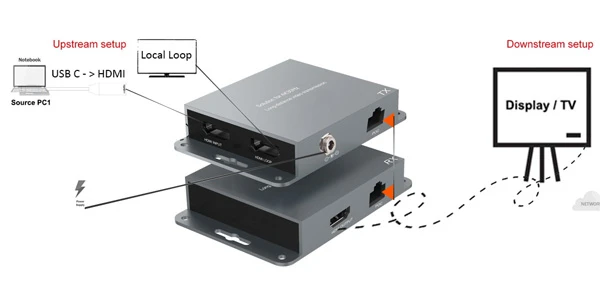
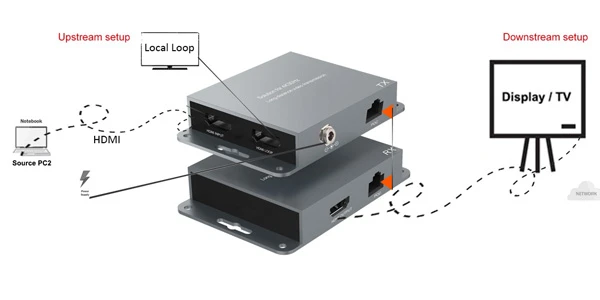
Key Features:
- Extend 4K@30Hz HDMI signals up to 132 ft (40m)
- Extend 1080P@60Hz signals up to 230 ft (70m)
- Single CAT5/CAT6/CAT7 cable transmission
- PoC (Power over Cable) - only one power adapter required
- HDMI Loop-Out for local monitoring
- Zero-latency Video and Audio extension
- Smart EDID management for improved compatibility and stable signal transmission
- Compact metal housing with mounting ears for easy installation
- Ideal for home theaters, conference rooms, classrooms, digital signage, control rooms, and commercial AV applications
Reliable long-distance HDMI extension made simple, with intelligent EDID management ensuring optimal compatibility between your source device and display.
| Connectivity | |
| Transmitter | INPUT: 2 × HDMI Type A, 19-pin female1 x DC 5V USB TYPE-C, Power Input1 x RJ45 Female , 8-pin female |
| Receiver | OUTPUT: 1 x HDMI Type A, 19-pin female1 x DC 5V USB TYPE-C, Power Input1 x RJ45 Female , 8-pin female |
| Video Bandwidth: | 10.2Gbps |
| Video Resolutions: | up to HDMI1.4 at 4k@30hz |
FAQ
Q: Is this HDMI Extender is 18Gbps or 10.2Gbps ?
A: 8K/30Hz at 8-bit requires approximately 24 Gbps, which called HDMI2.1. 4K/60Hz at 18Gbps tops out which called HDMI2.0 4/30Hz at 10.2Gbps tops out which called HDMI1.4 Our HDMI extender kit support HDMI1.4 at 4K30Hz and downward compatible with 2K@60Hz.
Q: Which is better resolution output , 4K 30Hz or 4K 60Hz?
A: While 4K@60Hz is ideal for ultra-smooth motion and gaming applications, 4K@30Hz remains the preferred choice for most business environments. For conference rooms, classrooms, digital signage, and commercial displays, 4K@30Hz provides sharp UHD image quality at a more economical price point, making it one of the most common and practical solutions in professional AV installations.
Q: why your HDMI Extender shows support 4K ,but i got 1080P ?
A: The extender can only transmit the resolution it receives from the source device.So pls Make sure the source is set to 3840×2160 (4K). Transmission Distance Exceeds the 4K Specification This HDMI extenders support: 4K@30Hz up to 40m (132ft) 1080P up to 70m (230ft) If the cable run is longer than the rated 4K distance, the system may automatically reduce to 1080P.
- Conference Rooms & Meeting Spaces – Extend HDMI signals from laptops, video conferencing systems, or media players to remote displays and projectors.
Classrooms & Training Centers – Connect teaching computers to projectors or large displays located away from the source equipment.
Digital Signage – Deliver high-quality content to displays in retail stores, shopping malls, restaurants, airports, and public venues.
Home Theaters – Place media players, AV receivers, or gaming consoles in a central location while displaying content on a distant TV or projector.
Control Rooms & Monitoring Centers – Extend video feeds to monitoring stations while maintaining reliable signal quality.
Broadcast & AV Installations – Distribute HDMI signals across studios, production environments, and event venues.
Hotels & Hospitality Venues – Connect centralized media sources to displays in lobbies, meeting rooms, and public areas.
Exhibition Booths & Trade Shows – Transmit high-resolution content to display screens without requiring long HDMI cables.
Security & Surveillance Systems – Extend NVR/DVR video outputs to remote monitoring displays.
Crystal-Clear Visuals. Smooth Performance. Effortless Connectivity:
How to connect the HDMI extender transmitter & Receiver
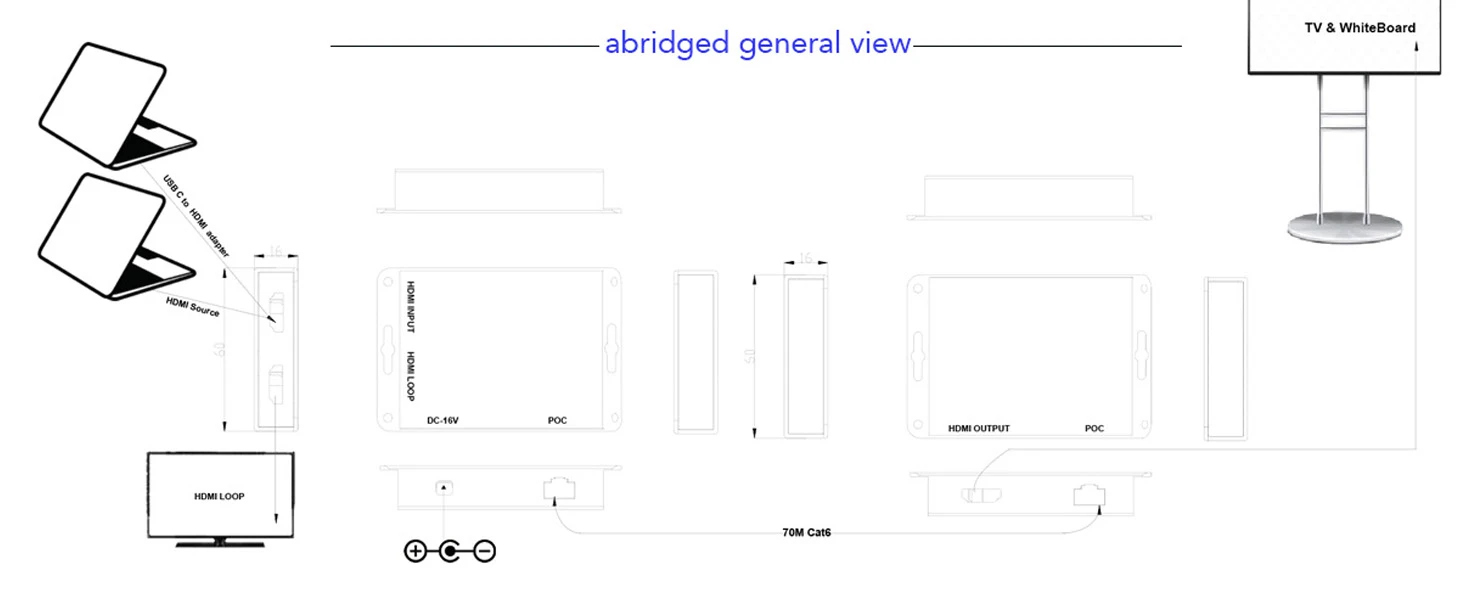
if your laptop is the latest USB C DP Alt mode or Thunderbolt 3/4/5 , you need a cable adapter via USB C to HDMI 4K adapter. then it can convert the USB C signal to HDMI signal.
2. if you need loop-out , Plug the HDMI male to HDMI male cable on transmitter(TX) HDMI female port and the other is one local monitor HDMI port.
3.Plug the receiver(RX) HDMI into a video output devices with HDMI and plug the USB C 5V charging cable to keep power supply for the receiver part.(Receiver need power connection when use).
4.After connecting the receiver and transmistter . plug the net cable Cat5/6/7/8 into the HDMI extender both Transmitter and Reciever . then it will automaticlly connection.
Flexible Installation with Optional HDMI Angle Adapters
Display mounted too close to the wall? No problem.
We offer a range of HDMI angle adapters to help overcome installation limitations behind TVs, monitors, and interactive touch displays. These adapters make connections easier, reduce cable strain, and provide greater flexibility for wireless HDMI receiver placement.


| OEM Packaging and Delivery | |
| Package include : | 1x Transmitter and Receiver |
| Package meansure: | 40*30*20CM |
| PCS/CTN : | 50pcs/ctn . 25 Pairs |
| GW/CTN (Kgs): | 10.5KGS |
With our latest products, people can share content, collaborate with both in-room and remote attendees wirelessly, whatever devices they use, wherever they sit, no messy cables, no hassle of A/V knowledge, people just need focus on the conference, our products will back up everything smoothly.
Hot Tags: 4k 30hz hdmi extender over ethernet, China, factory, suppliers, manufacturers, OEM,ODM Service, wholesale, brands, low price, customized, bulk, dropshipping, in stock, online sales, best brand, best sale, made in China
Previous
No InformationSend Inquiry
You Might Also Like


